Overview
This guide helps you evaluate the SheetXAI AppSumo lifetime deal by matching the offer's features to the way you plan to use SheetXAI. The walkthrough covers plan tiers, team seats, automations, mini apps, bulk row-by-row operations, Excel access, and AI usage options.
Offer details can change. Verify the current AppSumo page and the entitlements shown in your account before purchasing; this guide intentionally avoids hard-coding prices or seat counts.
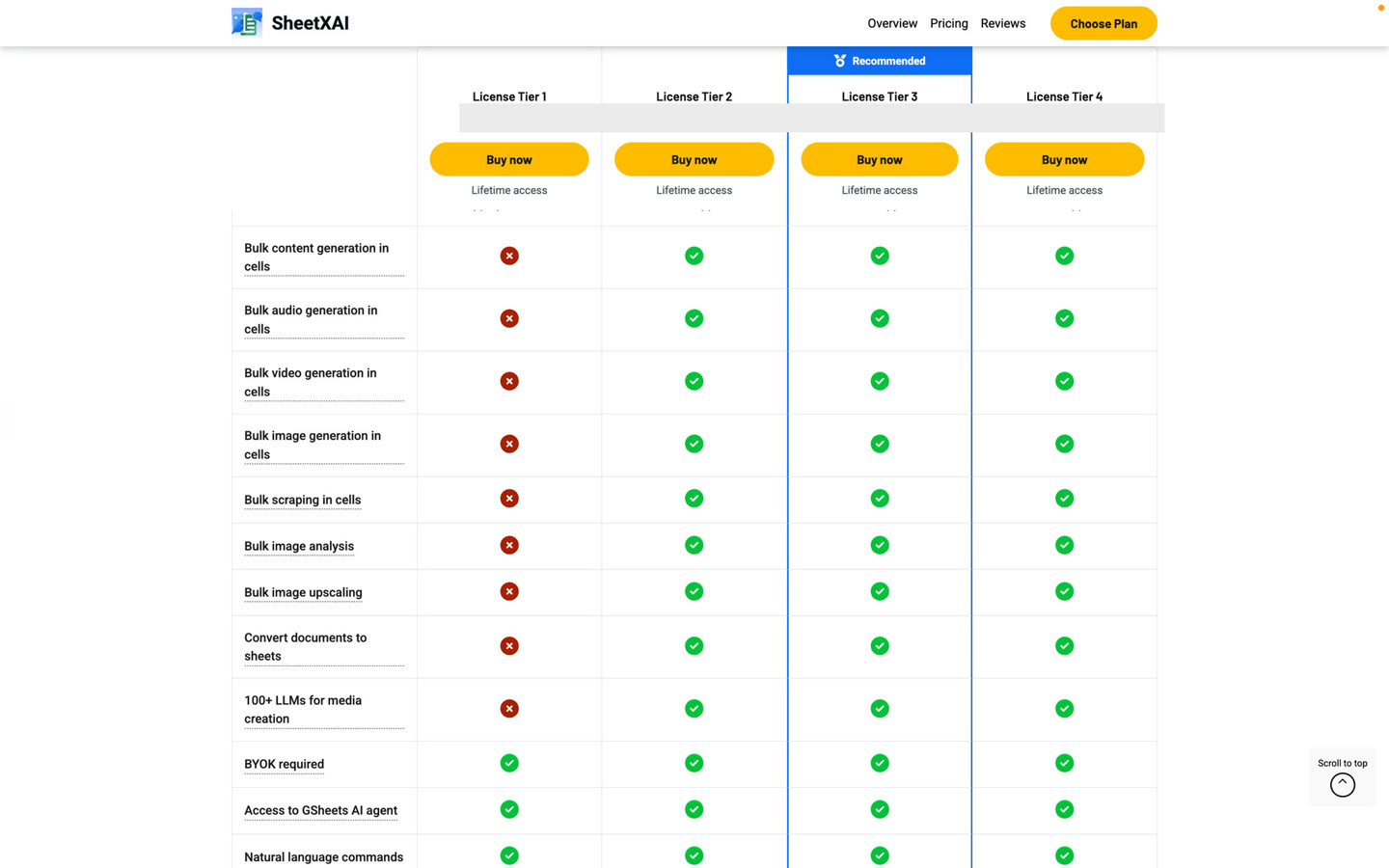
What the recorded tier comparison shows
In the recording, Tier 1 is described as having up to 10 daily and weekly automations combined, no hourly automations, and up to 10 mini apps per month. The presenter contrasts this with Tier 2 and above, which the recording describes as having unlimited automations and mini apps. The bulk row-by-row operations shown later in the video are also presented as a Tier 2-and-above capability.
These are details from the recorded offer walkthrough, not a guarantee about today's deal. Offers and entitlements can change; use your AppSumo purchase page and the current deal terms as the source of truth. The screenshot intentionally omits the recorded price amounts.
Before choosing, map the features to the work you expect to do:
- Automations: Does the current tier support the cadence and number of recurring tasks you expect?
- Mini apps: Is the current monthly creation allowance enough for your plans?
- Bulk operations: Will you need to process many spreadsheet rows in one row-by-row job?
- Team seats: How many people need access, and which accounts will they use?
- Excel access: Is Excel included, or is it a separate add-on for the offer you are considering?
- AI usage: Will you use SheetXAI credits, bring your own provider API key (BYOK), or use a mix?
Understand AI usage separately from the LTD
The lifetime deal covers the SheetXAI product entitlement; AI usage may be handled separately. Depending on the current offer and your setup, you may be able to use SheetXAI credit packs or connect your own API key.
- SheetXAI credits: Check whether a credit add-on is offered and how its one-time balance is assigned and consumed.
- Bring your own key: The API provider associated with your key handles usage billing under its own terms. Keep keys private and review the provider's pricing and limits.
Do not assume that credits renew monthly or that every tier includes the same add-ons. Confirm those details in the offer attached to your purchase.
A practical way to choose
- Write down the jobs you expect to do in Sheets or Excel.
- Estimate how many teammates need their own seat.
- Mark whether you need automations, mini apps, or bulk row-by-row work.
- Decide whether you prefer SheetXAI credits, BYOK, or both.
- Compare that list with the current AppSumo tier descriptions and add-ons.
- Save a copy of the offer terms for your purchase so you can check your entitlements later.
If you already purchased the deal, continue with activation and setup to redeem it, assign seats, install SheetXAI, and configure AI usage.