Overview
This Replacing Clay episode demonstrates a lead-scoring workflow. SheetXAI compares each lead's supplied information with an ideal customer profile (ICP) and fills in a score, a rationale, and the biggest gap. The video uses mock lead data; those example scores are not findings about real prospects and are not calibrated probabilities.
Set up the lead table and rubric
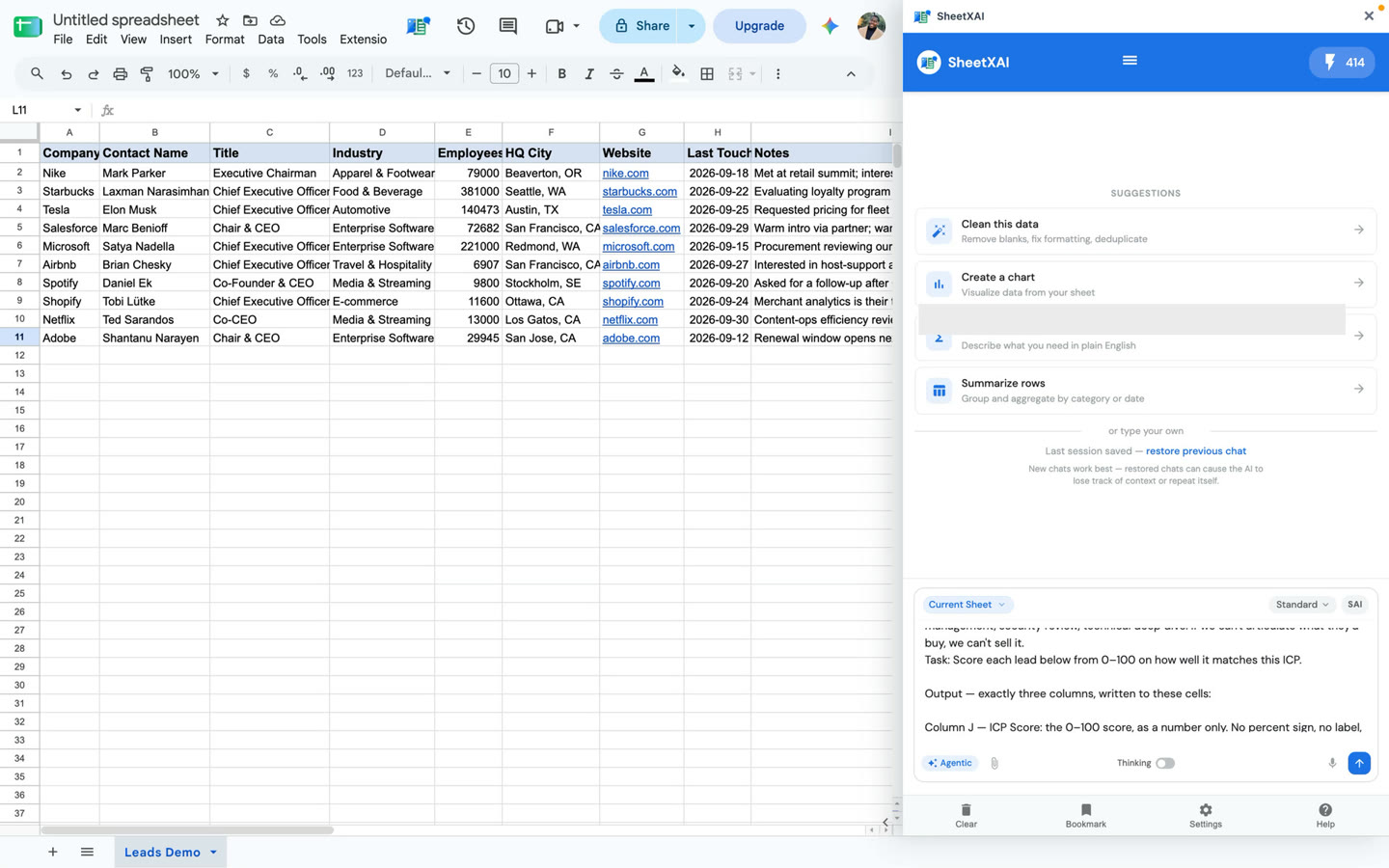
Keep one lead per row, with clearly labeled columns for the facts you want considered. The demonstrated sample includes company and contact information and other lead context. Add three output columns:
- ICP Score
- Rationale
- Biggest Gap
Write the ICP as criteria you can apply consistently. In the video, the example rubric describes enterprise scale, modern and tech-forward industries, US headquarters with a preference for the West Coast, access to a decision maker, active buying intent, and recent engagement. Treat those as example criteria, not a universal template. Replace or adjust them to match your own market and evidence.
Run a scoring pass
This is an adapted, copyable prompt based on the transcript. It makes the output fields explicit; supply your own ICP and field names:
Use subagents to evaluate the leads row by row against this ideal customer profile: [describe your ICP and any priorities or scoring rules]. For each row, write an ICP score in the ICP Score column, explain the score using the lead information in the Rationale column, and identify the most important missing or mismatched criterion in the Biggest Gap column. Do not assume facts that are not present in the row.
- Open SheetXAI and select a small sample of leads first.
- Submit the prompt with your actual ICP description and the names of your input and output columns.
- Review the preview. Check whether the rationale follows your stated criteria and whether the biggest gap reflects the row's available information.
- Clarify any ambiguous criteria or score scale, then rerun the sample if needed.
- When the sample is consistent with your rubric, ask SheetXAI to score the remaining leads.
- Review the full results and correct scores affected by stale, missing, or misunderstood inputs.
Interpret the outputs
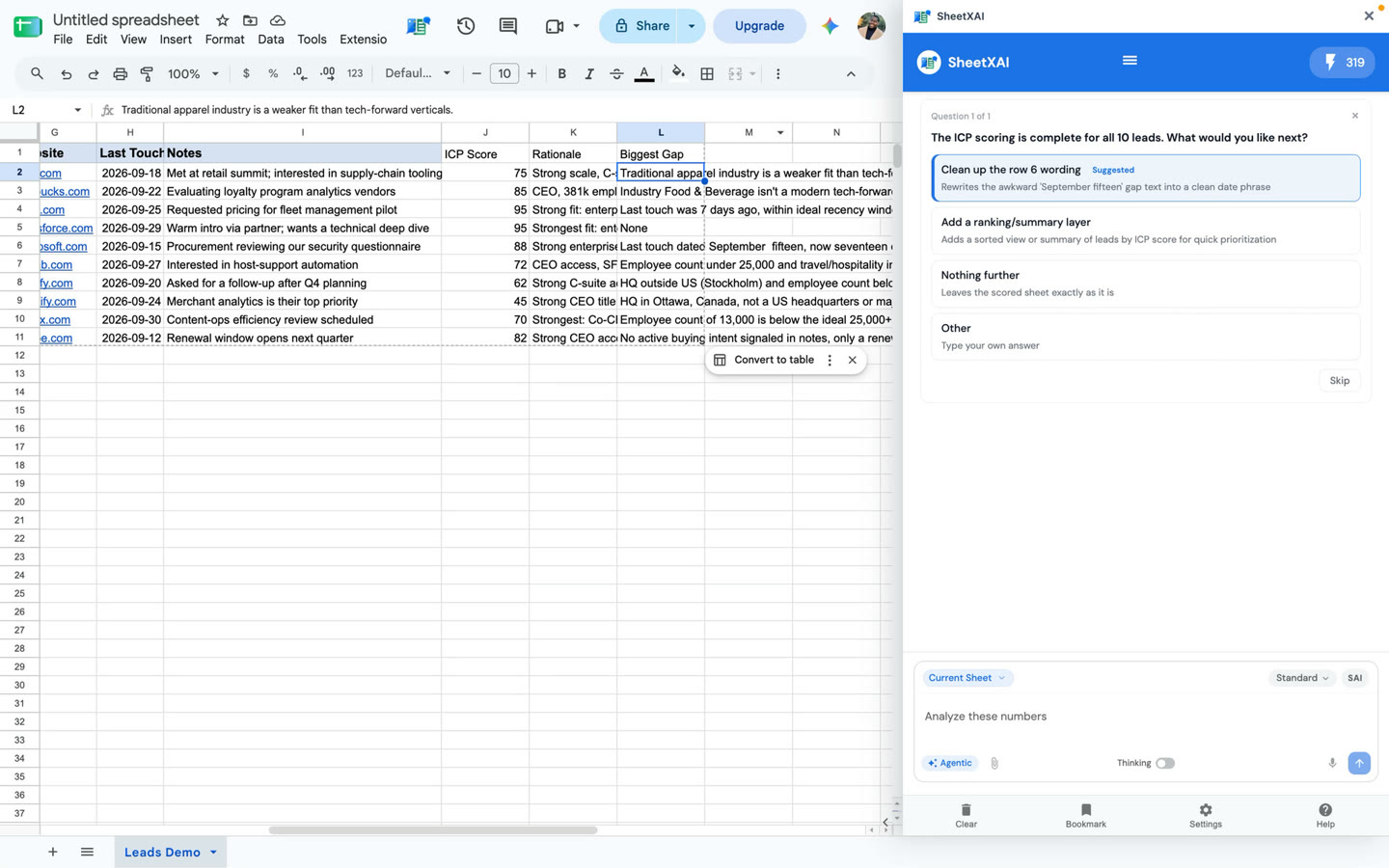
The score is a sorting or triage aid, not a probability of purchase or a validated prediction. A rationale helps make the result reviewable; it does not prove that the underlying lead facts are true. Check important facts against your sources, and update the prompt if the rubric is being applied inconsistently.
Do not use an unexplained generated score as the sole basis for a consequential decision. Keep the mock results in the video separate from actual prospect research.
Troubleshooting
- Scores vary for similar leads: Make the scoring scale and criteria more explicit, and compare several reviewed examples.
- A rationale uses unsupported details: Remove or verify those facts, then ask the model to rely only on supplied fields.
- The biggest gap seems wrong: Check whether the needed criterion appears in the input row and clarify what should count as missing versus mismatched.
- A lead has too little information: Treat the score as provisional or gather better evidence before prioritizing.
Replacing Clay series
Continue in order: